
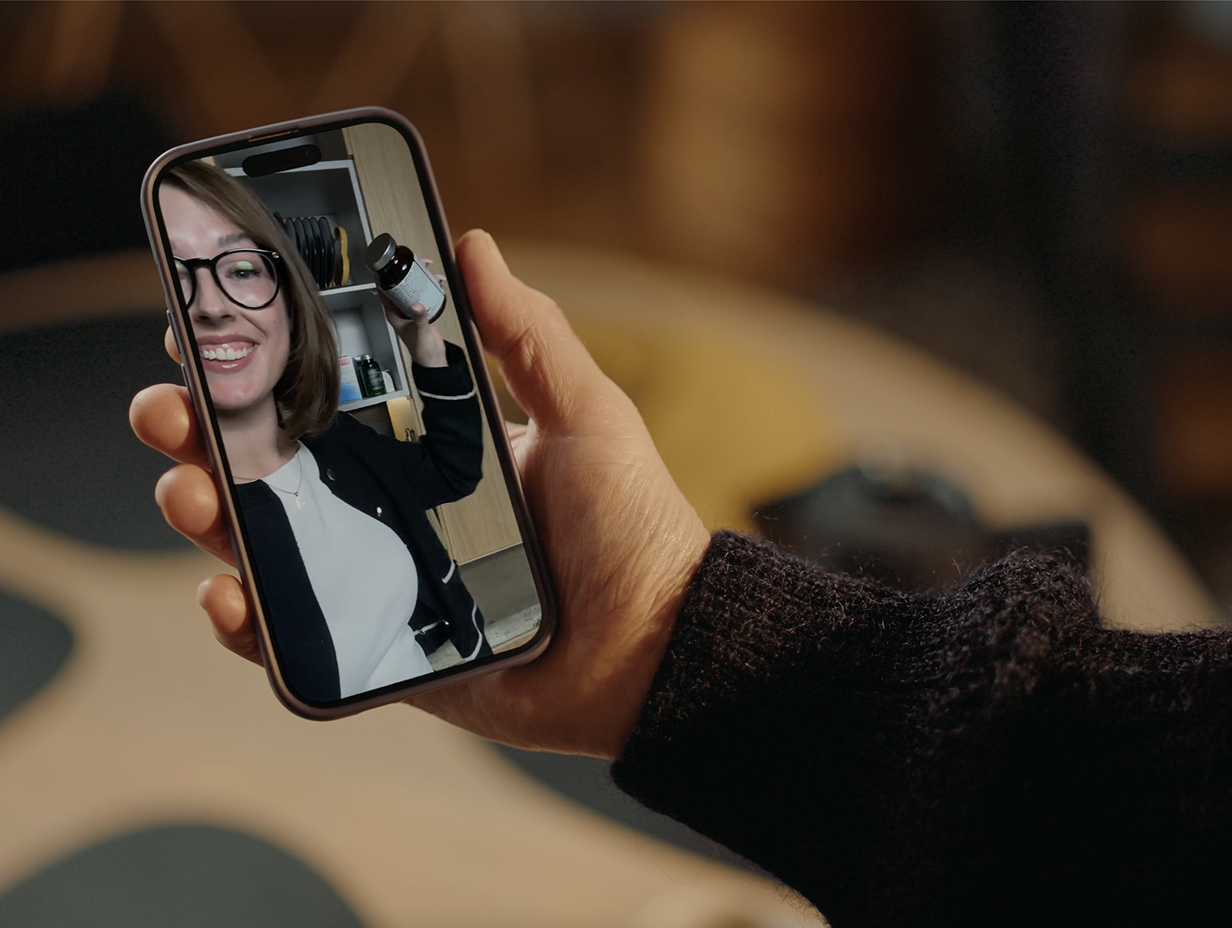
A phone buzzes on the kitchen bench. The screen says "Medication, 8:00am." Your mum glances at it, puts the phone down and carries on making toast. Twenty minutes later she has no memory of the alert, and the tablets are still in the box.
Now picture the same moment with a short video. It's you, holding up the pill organiser: "Morning Mum, it's Kate. Today is the Tuesday section, the one on the left. Take them with your toast." She watches it, knows who is asking, and knows exactly what to do.
That's the idea behind video reminders. This guide covers why they can suit people living with dementia, what families use them for, how to record ones that help, and where their limits are.
Why Standard Reminders Often Miss the Mark
Most reminder apps were built for busy people with good memories. They assume the person will read a short line of text, understand it without context, and remember to act on it once the screen goes dark.
Dementia makes each of those steps harder. The Alzheimer's Society explains that people with dementia can struggle to remember recent conversations because the brain may not have stored the information in the first place. A text alert that just says "Tablets" relies on the person remembering which tablets, where they are kept and whether they've already taken them today.
Small screens and small fonts add to the problem. A generic alarm tone gives no clue about what it's for. You end up with a reminder that goes off at the right time but doesn't lead to the right action.
What Makes a Video Reminder Different
A video reminder is a short clip, usually recorded on a phone by a family member or carer, that plays at a scheduled time. Three things set it apart from a text alert.
It comes from someone they know. A familiar face and voice tells the person straight away that the message is meant for them and can be trusted. The Alzheimer's Society also notes that someone who struggles to recognise faces may still recognise a person's voice, which gives a video two ways to land.
It shows as well as tells. You can hold up the pill box, point at the kettle or show which coat to wear. The Alzheimer's Society suggests breaking tasks into small, simple steps and making the items someone needs easy to see. A video does both in about 20 seconds.
It carries tone. "Take your tablets" on a screen reads like an instruction. The same words said warmly by a daughter or grandson feel different. Tone matters for someone who may already feel anxious or embarrassed about forgetting.
It's worth being honest about the evidence. There isn't a large body of research on video reminders specifically. What does exist is well-established guidance on supporting memory loss: keep instructions simple, use visual cues, build routines and respond with reassurance instead of correction. A good video reminder puts all of that into one short clip.
What Families Use Video Reminders For
Medication gets most of the attention, and it's a good place to start. Our guide to encouraging medication adherence without conflict covers the wider picture. Families also use video reminders for:
Morning routines: "Good morning Dad, your clothes are on the chair. Shower first, then breakfast."
Drinks: "Have a glass of water with lunch, Mum. The jug's in the fridge." Our hydration tips for people with memory loss go into more detail.
Appointments: "Sarah's picking you up at two for the doctor. Your coat's by the front door."
Evening safety checks: "Before bed, check the back door is locked and the heater is off."
Connection: a goodnight message from a grandchild, or a quick "thinking of you" on a harder day.
That last one matters more than it looks. Not every video needs a task attached. For a parent who lives alone, hearing a familiar voice at the same time each evening can be part of what makes the day feel settled.
How to Record a Video Reminder That Helps
Small choices make a big difference. These tips draw on the Alzheimer's Society's advice on memory aids and tools and on supporting someone with memory loss.
Keep it short. Aim for 15 to 30 seconds and one task per video.
Say who you are. "Hi Mum, it's Kate." Don't rely on recognition.
Use their words. If Dad calls it "the blue box", call it that too.
Show the object. Film the pill organiser, the glass or the door, in good light, held still.
Give one step at a time. "Take the tablets from the Tuesday section" is easier to follow than a list.
Keep the tone calm and warm. Smile, speak slowly, and skip "don't forget", which puts the focus on forgetting.
Refresh it now and then. A new recording every few weeks stops the message fading into the background.
Ask how it's landing. If a video confuses or upsets the person, change it or stop using it.
Think about who records what, too. In many families one person ends up doing everything. Spreading recordings across siblings, partners and grandchildren shares the load and gives the person more familiar faces through the week. Our article on sharing dementia care with your siblings has more ideas for dividing the work.
Video reminders are built into Elli Cares. Anyone in the family care circle can record a short clip on their phone, schedule it as a one-off or recurring reminder, and it plays full screen when it's due. The activity log shows the family how the day is going, so a missed routine gets noticed sooner and can be talked about gently.
Where Video Reminders Fit, and Where They Don't
Video reminders are one tool among several. They tend to work best when the person can still follow a simple prompt and manage parts of their day on their own, which often means the earlier stages of dementia.
They have limits. A video can prompt someone to take their tablets, but it can't confirm the right dose went in. If a medication mistake could be dangerous, talk to the pharmacist about blister packs or other options, and involve the person's doctor. Our guide to managing medications at home is a useful starting point.
As dementia progresses, acting on a prompt alone may get harder. At that stage many families shift the videos away from tasks and towards connection: a familiar face, a favourite song, a few words of reassurance before bed.
It's also worth asking the person what they want. Some people love hearing from family through the day. Others find frequent prompts intrusive, even when they're kindly meant. Starting with one or two reminders a day and building from there keeps the person in charge. Our piece on supporting ageing parents without taking over talks through that balance.
Helpful When You Live Far Away
For families supporting someone from another city or country, video reminders do something a phone call can't. They arrive at the right moment even when you're at work, asleep or in a different time zone.
They also mean your parent hears from you on days you can't call. Paired with a regular check-in call, they can make the distance feel a bit smaller. Our guide on supporting a loved one with dementia from afar covers the rest of the long-distance routine.
Frequently Asked Questions
Do video reminders work for people with dementia?
Research on video reminders specifically is limited. They combine approaches that dementia organisations recommend, including simple instructions, visual cues, familiar voices and routine, and many families find them easier to follow than text alerts, especially in the earlier stages.
How long should a video reminder be?
Around 15 to 30 seconds, with one task per video. Longer clips make it harder to pick out the instruction.
Who should record the videos?
Anyone the person knows and trusts. Sharing the recordings across the family spreads the load and adds variety.
Can video reminders replace a carer or medical supervision?
No. They support routines but can't confirm a task was done correctly. If safety is a concern, speak to the person's doctor or pharmacist.
One Small Thing to Try This Week
If your parent keeps missing a routine, record one video for the task that matters most. Keep it short, say who you are and show the object. See how they respond, then build from there.
You can see how video reminders work inside Elli Cares on our Seniors and Families page.

